
WordPress ads: sell sponsor spots on WordPress
 Nishant · Updated 10 Oct 2026 · 4 min read
Short answer
To sell sponsor spots on WordPress, add your keyed Sponsor.st script to the site footer with a plugin such as WPCode, then mark a placement on the live page. WordPress.com needs a plugin-enabled paid plan. Clear any page cache after installation, verify the script, and connect your payment account before sharing the booking page.
On this page
<script src="https://cdn.sponsor.st/s.js" data-site="YOUR_KEY" async></script>Your key is filled in once you add your site.
Start freeAdd Sponsor.st to WordPress
-
Get your snippet. Create a free account, add your site and copy the tag from the site's page; your key is filled in.
-
Paste it. Install a header and footer code plugin, such as WPCode (or use your theme's footer code setting). Paste the snippet into the footer box and save.
<script src="https://cdn.sponsor.st/s.js" data-site="YOUR_KEY" async></script> -
Click Check under "Check the install" on your site's page in the dashboard (on first setup it's at the bottom of the install card). Added it through a tag manager? Use Check DNS (a TXT record) or Check file instead.
-
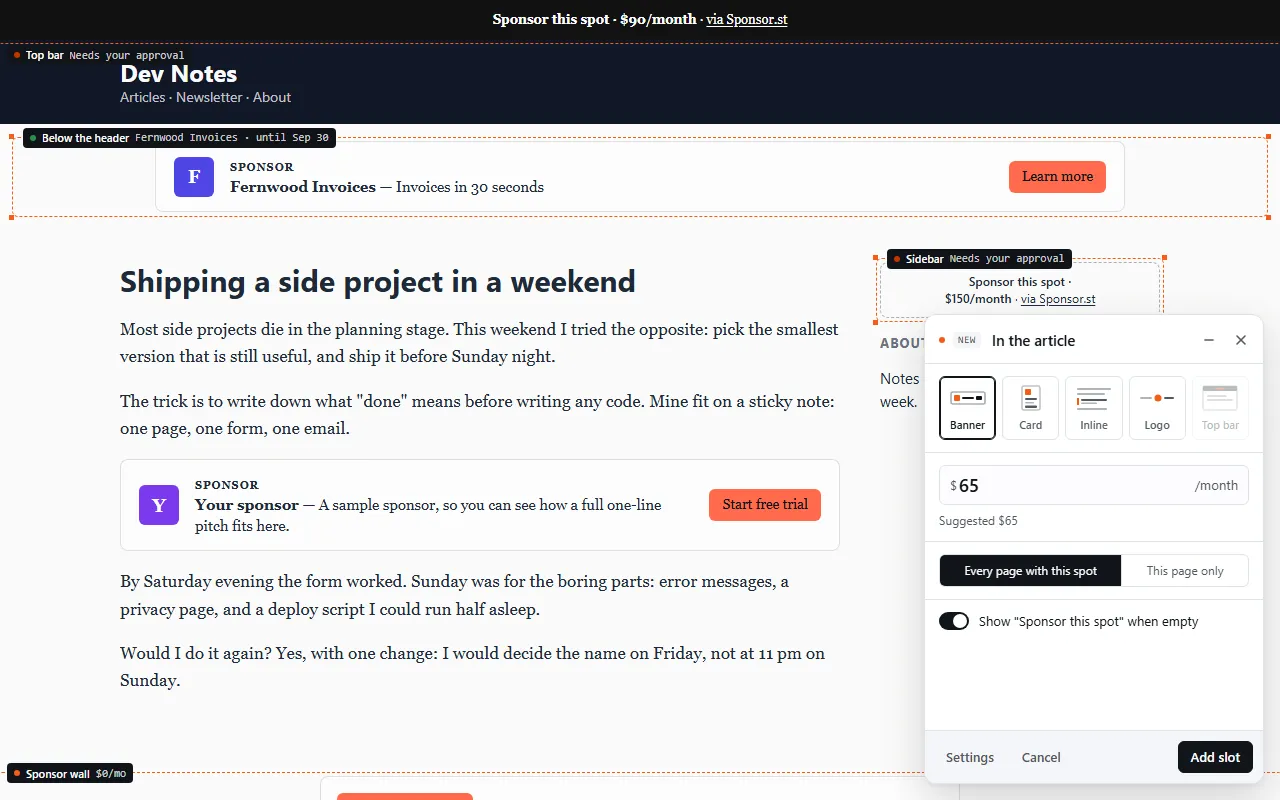
Mark a spot. Open the editor on your live page, click where a sponsor goes, pick a format (Banner, Card, Inline mention, Logo strip or Top bar) and set a monthly price.
-
Connect Stripe or Dodo, then share your booking page or add the "Advertise on {domain}" link to your footer.
WordPress notes
Block themes. Block themes (Twenty Twenty-Four and newer) have no footer.php to edit, so use a plugin like WPCode rather than theme files. Code pasted into a theme file is also lost when the theme updates.
Caching plugins. WP Rocket, LiteSpeed Cache, W3 Total Cache and similar plugins serve a saved copy of your pages. After adding the snippet, clear the cache, or visitors keep getting pages without the script. If your plugin delays or combines JavaScript (WP Rocket's "Delay JavaScript execution", LiteSpeed's "JS Combine"), exclude cdn.sponsor.st so spots show without waiting for a scroll or click.
WordPress.com. WordPress.com's plugins page says "Installing plugins is available on all WordPress.com paid plans: Personal, Premium, Business, and Commerce plans." Its code page says "You can use JavaScript on sites with a plugin-enabled plan and activated hosting features"; free sites have limits on the code you can add.
Page builders. Elementor, Divi and other builders work as normal. The snippet sits in the site footer, so it runs under any builder, and you mark spots on the live page rather than inside the builder.
If Check can't find the script
- The cache still serves the old page. Clear your caching plugin's cache (WP Rocket, LiteSpeed Cache, W3 Total Cache), then click Check again.
- The optimiser delays or combines JavaScript. Exclude
cdn.sponsor.stfrom "Delay JavaScript execution", "JS Combine" and similar settings. - The snippet went into footer.php and a theme update removed it. Paste it into WPCode instead.
- A free WordPress.com site. It can't run the plugin or the script; it needs a plugin-enabled plan.
Removing it
Wait until running bookings have ended before deleting the tag. Removing it takes the script and its spots off your pages. If your site gets visits every day, a running booking logs downtime from the last time the script was seen; at the booking's end, those days become a refund due that you pay from your own Stripe or Dodo account. Pulling a booking early also leaves a refund due for its unused days.
A worked example
Across 25 published websites with monthly USD prices, the median cheapest offer is $125; the middle half ask $50 to $300. These are asking prices, not confirmed sales.
Currently published directory: 43 unique domains. Source observations: 2026-10-08 to 2026-10-09. Asking prices, not confirmed sales. USD monthly website offers; each domain contributes its cheapest offer. A format cohort includes sites offering that format, not the individual placement price. Traffic bands describe stated visitors or pageviews; they are not CPM estimates. Groups need at least 10 unique domains.
FAQ
Will the script slow my WordPress site?
It is small and loads with async, after your content.
Can I sell a spot on one post only? Yes. A spot belongs to the page where you click it. Mark it on a single post, or on a layout that repeats across all your articles.
Do I need an ad plugin as well? No. Sponsor.st handles direct sponsorships: booking, payment, and the ad going live and coming down on its dates. If you also want programmatic ads, an ad network plugin runs alongside it.